 Skip to content

WimbaAPP for Veterinary Clinics: How to Start Offering Custom Orthotics
WimbaAPP for veterinary clinics provides a guided route from professional account registration to product-specific patient data, ordering, order-status tracking, and shipment information. A practice can begin with eligible WIMBA GO cases without investing in WimbaSCAN equipment, then add the WIMBA PRO pathway later if its caseload and clinical goals justify Provider PRO onboarding.
The app does not turn device selection into an automatic process and does not replace assessment, prescription, fitting, owner education, or follow-up. This guide explains what WimbaAPP for veterinary clinics actually does, how GO and PRO requirements differ, where a WIMBA Case Consult fits, and what a practice should have ready before launching a custom dog orthotics service.
What “the fastest way to start” should mean
A GO-first launch has the lowest technical setup because eligible GO orders do not require WimbaSCAN or WimbaBOX. It is not a shortcut around clinical preparation. A dog orthotic fitting clinic still needs a repeatable assessment, measurement, first-fitting, skin-monitoring, owner-training, and recheck process before accepting cases.
What Is WimbaAPP for Veterinary Clinics?
WimbaAPP for veterinary clinics is WIMBA’s professional ordering application for custom veterinary orthoses. It is available for iOS and Android and requires a professional account. The current workflow allows a clinic to create and verify its account, enter company and delivery details, select an available device, submit the requested case materials, place an order, and keep order information organised in one place.1
The current App Store release also lists direct clinic registration, billing and shipping details, purchase-order numbers, step-by-step order tracking, and shipment tracking.2 Features may change as the app is updated, so the current in-app sequence remains the source of truth when a team collects patient data or places an order.
One clinic account
Store verified practice, billing, shipping, and order information in one professional workspace.
Product-specific data
Follow the current prompts for photos, measurements, scans, clinical information, and supporting media.
Order visibility
Keep orders organised and review their progress and shipment information from the practice account.
WimbaAPP for Veterinary Clinics: What the App Does
A reliable digital orthotic workflow separates ordering support from clinical responsibility. WIMBA uses the submitted data to design and manufacture the selected device. The treating practice retains responsibility for the patient assessment and for deciding whether the device fits the diagnosis, treatment plan, and intended function.
| WimbaAPP and WIMBA support | Treating clinic responsibility |
|---|---|
| Professional account and order management | Veterinary diagnosis and patient selection |
| Product-specific data-entry prompts | Accurate history, examination findings, imaging, and intended mechanical goal |
| Upload of photos, measurements, scans, and requested media | Correct acquisition, labelling, laterality, and quality review before submission |
| Digital design and manufacturing after an accepted order | Prescription, first fitting, device configuration, and functional assessment |
| Order-progress and shipment information | Owner education, wear instructions, skin checks, follow-up, and escalation of concerns |
WimbaAPP for veterinary clinics removes casting and production from the clinic’s workload, but it does not remove clinical decision-making. A practice should treat every submission as part of the medical record and document why the selected device and configuration are appropriate.
For a closer look at how this digital workflow compares with traditional plaster and fiberglass casting, see our guide: 3D Printed Dog Orthotics vs Traditional Cast-Based Devices.
WimbaAPP for Veterinary Clinics: GO Is Not One Universal Checklist
The draft phrase “two photos and manual measurements” is accurate for current Carpus GO and Tarsus GO limb workflows, but it should not be applied to every GO product. Veterinary orthotics ordering must follow the prompts and measurement card for the exact product selected in the current app.
| Current GO pathway | Data acquisition | Important distinction |
|---|---|---|
| Carpus Orthosis GO | Two clear limb photographs and the current product-specific manual measurements entered through WimbaAPP3 | No WimbaSCAN; intended for selected mild or less complex carpal cases within current indications |
| Tarsus Orthosis GO | Two clear limb photographs and the current product-specific manual measurements entered through WimbaAPP4 | No WimbaSCAN; do not assume that the carpal and tarsal measurement sets are identical |
| Cervical Collar GO | Three soft-tape patient measurements entered through WimbaAPP5 | The app suggests one of five predefined adjustable sizes; this is a sizing pathway, not a custom limb scan |
A clinic can use WimbaAPP for veterinary clinics to begin with eligible GO cases without buying PRO scanning equipment. That makes GO the lowest-setup entry point for a custom dog orthotics service, but the team still needs the correct manual measuring tools, clear photography, patient handling, fitting knowledge, and follow-up capacity.
Convenience does not determine candidacy
GO should be selected because the patient’s condition and mechanical objective fit the current product indications, not simply because it is easier to order. If the problem is complex, multiplanar, outside the stated indication, or difficult to define, request a Case Consult before choosing a device.
WimbaAPP for Veterinary Clinics: The PRO Pathway
WIMBA PRO is the scan-based route for selected more complex carpal, tarsal, and stifle cases. Access requires the applicable WIMBA Provider onboarding, PRO scanning equipment, and staff who can collect a reproducible WimbaSCAN. The team also submits the requested manual measurements, clinical information, and any supporting media required for the chosen device.610
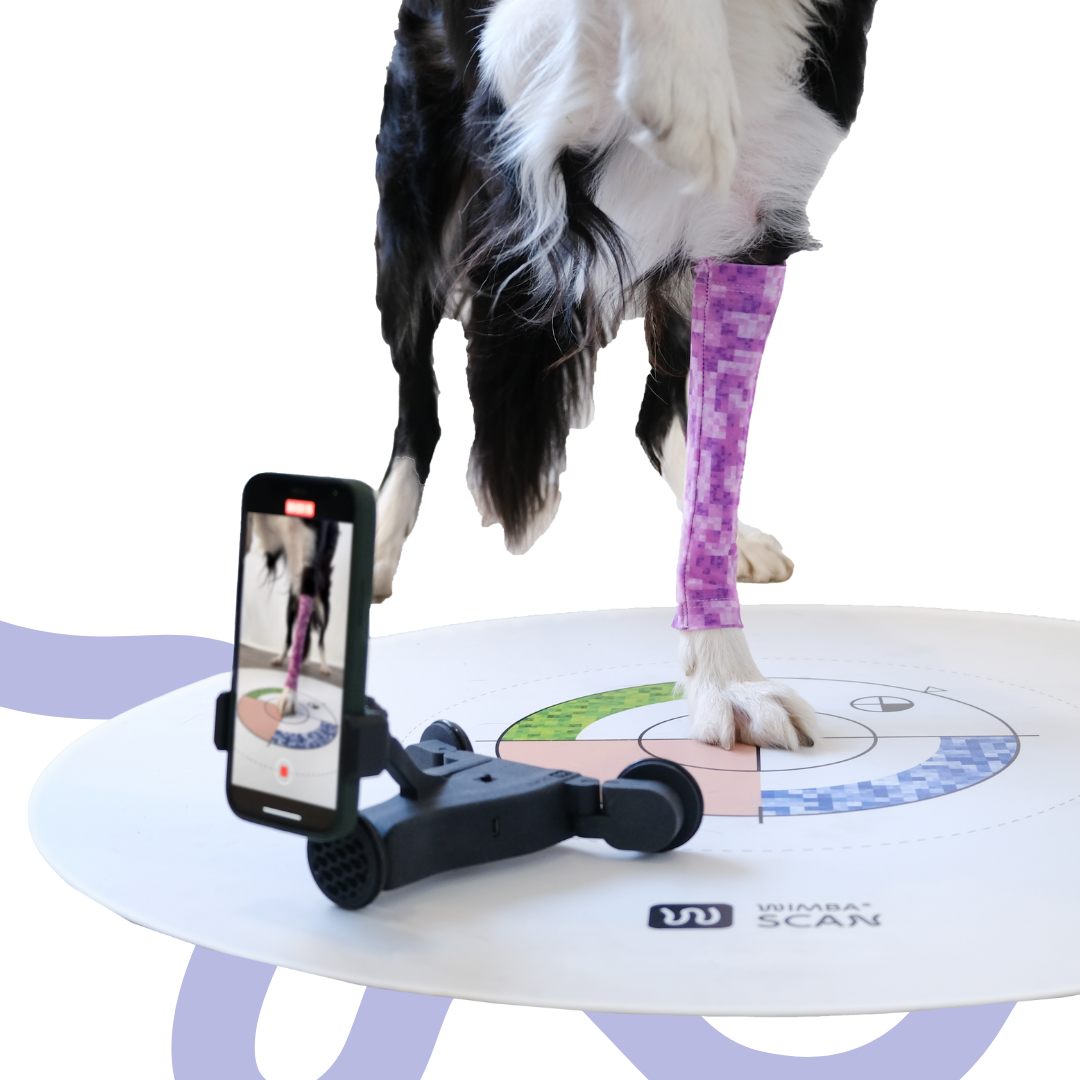
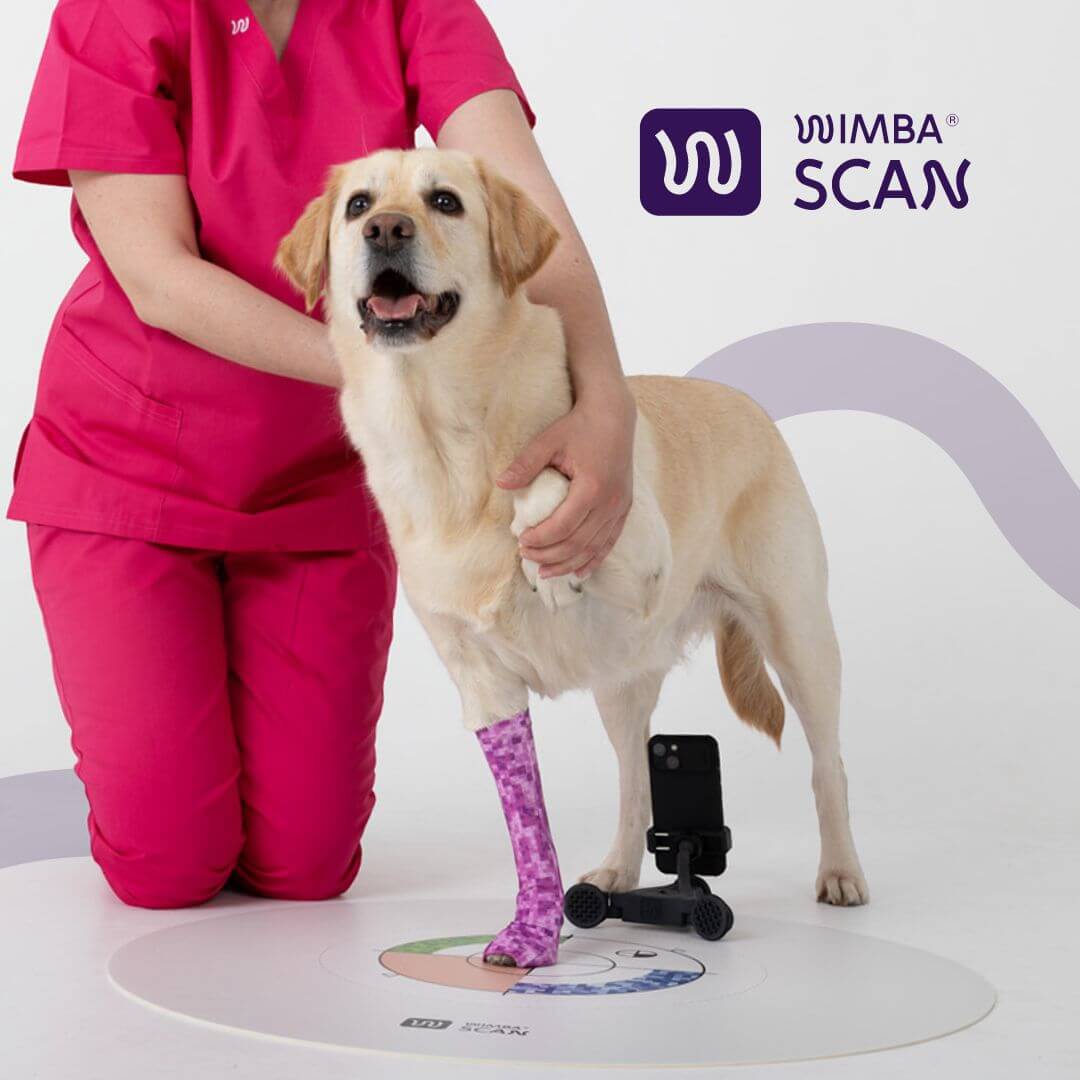
In this pathway, WimbaAPP for veterinary clinics is the submission and order-management environment. WimbaSCAN is the data-capture method. WimbaBOX is the physical equipment used to perform that method. These terms describe connected parts of one PRO workflow, not alternative ways to order.
WimbaBOX supports WimbaSCAN
- Printed calibration mat: provides the visual reference and scanning area required by the workflow.
- AutoDolly: moves the smartphone around the limb to support consistent video capture.
- Patterned sleeves: provide the visual surface required to distinguish limb geometry.
- Cohesive bandages: may be used as specified when a sleeve is not the appropriate option.
- Current instructions and supporting tools: guide patient positioning, lighting, scan path, and quality control.7
A smartphone alone does not replace WimbaBOX for PRO. Equally, buying WimbaBOX does not complete WIMBA Provider onboarding. The clinic needs access approval, staff training, a suitable scanning space, and a process for checking lighting, patient movement, limb coverage, video completeness, and the accompanying manual data before submission.
WimbaAPP for Veterinary Clinics: Why Scan Technique Matters
WIMBA’s published internal WimbaSCAN case study describes 69 scanned dogs, including 53 carpal and 16 tarsal cases. It is a workflow report rather than an independent clinical outcome trial, but it provides useful information about scan acquisition and the need for quality control.
WORKFLOW CASE STUDY
66 of 69 scans succeeded on the first collection
WIMBA’s internal 69-dog WimbaSCAN comparison included 53 carpal and 16 tarsal cases. Sixty-six scans produced usable measurements on the first attempt; three required recollection because of lighting or data quality. It illustrates why PRO onboarding must include scan technique and quality checks, not only app access.
The three recollections in the internal report involved poor lighting or insufficient scan and measurement data.8 A clinic should therefore plan a review step before pressing submit. A rushed scan that must be repeated is not faster than a carefully prepared one.
WimbaAPP for Veterinary Clinics and WIMBA Case Consults
A WIMBA Case Consult is a clinical-support step for veterinary professionals, not a confirmed order. The submitting team provides relevant history, examination findings, diagnosis, imaging or movement media, previous treatment, skin or behavioural concerns, and the intended functional goal. WIMBA’s Clinical Support Team reviews suitability and can suggest the most appropriate WIMBA pathway or flag concerns.9
For a practice using WimbaAPP for veterinary clinics for the first time, consultation is particularly useful when the condition is outside a familiar pattern, more than one joint is involved, instability occurs in several planes, surgery may still be indicated, or the team is unsure whether GO or PRO can meet the mechanical objective.
A Device Report informs the next step
The Case Consult can support device and pathway selection, but it does not transfer clinical responsibility to WIMBA. The treating veterinary professional remains responsible for diagnosis, prescription, informed discussion with the owner, fitting, wear recommendations, and follow-up.
WimbaAPP for Veterinary Clinics: Build the Ordering Workflow
For consistent veterinary orthotics ordering, a repeatable digital orthotic workflow prevents the app from becoming a collection of isolated orders that different staff members handle differently. The following sequence can be adapted to the practice’s medical-record, appointment, and quality-assurance systems.
- Create and verify the professional account. Add current practice, contact, billing, and shipping information and identify who can approve purchases.
- Assess the patient before selecting a product. Record diagnosis, affected structure, laterality, instability plane, range, pain, skin, gait, activity, owner goals, and relevant imaging.
- Define the mechanical objective. State what the device should limit, support, guide, or permit and how the team will evaluate success.
- Select GO, Cervical Collar GO, or PRO. Use current indications and complexity, not convenience alone. Submit a Case Consult if suitability is uncertain.
- Collect the exact requested data. Follow the current product sequence for photographs, measurements, WimbaSCAN, clinical media, and supporting documents.
- Perform an internal quality check. Confirm patient identity, side, measurement units, image clarity, weight-bearing position, scan completeness, and consistency between the form and record.
- Submit and track the order. Use a meaningful purchase-order number where helpful and monitor status and shipment information.
- Schedule the first fitting before delivery. Allow enough time for alignment, suspension, skin, configuration, and controlled gait assessment rather than treating collection as a handover.
- Document owner education and follow-up. Record application, removal, cleaning, skin checks, permitted activity, warning signs, and the date or trigger for reassessment.
Within WimbaAPP for veterinary clinics, the order is one part of this pathway. The clinic’s surrounding protocol is what turns veterinary orthotics ordering into a clinically governed service.
WimbaAPP for Veterinary Clinics: GO-First or PRO-Ready?
A practice does not need to launch every device pathway at once. WimbaAPP for veterinary clinics supports a staged approach, provided the clinic communicates accurately about which cases it can currently measure, order, fit, and monitor.
| Launch model | GO-first clinic | PRO-ready clinic |
|---|---|---|
| Initial scope | Eligible Carpus GO, Tarsus GO, and appropriately selected Cervical Collar GO cases | GO pathways plus selected complex carpal, tarsal, and stifle PRO cases |
| Technical setup | Professional WimbaAPP account, product-specific measuring tools, photography setup, and fitting workflow | All GO requirements plus WIMBA Provider onboarding, WimbaBOX, WimbaSCAN space, and trained scanning staff |
| Best reason to choose it | Build a safe service with lower setup requirements and a defined initial caseload | Serve a broader and more complex caseload with scan-based custom design |
| Common mistake | Accepting cases outside GO indications because the workflow is convenient | Underestimating scanning quality control, appointment time, fitting, and rechecks |
| Expansion trigger | Consistent referral demand, confident GO fittings, and recurring cases that require PRO control | Ongoing audit of outcomes, complications, staff competency, and service capacity |
The GO-first route is often the most practical way to test demand for a custom dog orthotics service. PRO should be added because the clinic has the caseload, training capacity, fitting skill, and follow-up system to use it responsibly, not because WimbaBOX has become available.
WimbaAPP for Veterinary Clinics Does Not End at Delivery
The finished orthosis is delivered to the practice for professional fitting. The team should verify the patient and side, inspect the device, review orientation and configuration, assess contact and suspension, observe controlled movement, compare the skin before and after the first wearing period, and document the baseline. Product-specific manuals and the treating clinician’s plan determine how use is introduced.
Planned follow-up is essential. In a prospective study of 43 dogs using custom orthoses or prostheses, 39 experienced at least one complication; skin problems, mechanical issues, and device non-acceptance were important categories.11 The study included different devices and diagnoses, so it is not a WIMBA-specific complication rate, but it demonstrates why every dog orthotic fitting clinic needs a structured recheck and escalation process.
Plan before the first order arrives
- Who performs and documents the first fitting?
- Who teaches the owner application, removal, cleaning, and skin monitoring?
- Which findings require the device to be removed and the clinic contacted?
- When is the first planned recheck?
- How are fit concerns, device damage, or clinical deterioration communicated to WIMBA?
- How is the service priced to include fitting and follow-up rather than only the device?
WimbaAPP for veterinary clinics can make the order traceable, but only the practice can make the clinical follow-through reliable. That distinction should be included in staff training, owner information, service pricing, and marketing claims.
WimbaAPP for Veterinary Clinics: First-Order Readiness
Before marketing the practice as a dog orthotic fitting clinic, confirm that the following elements are in place:
- a verified professional account and named account administrator;
- a clinical lead responsible for case selection and prescriptions;
- current product indications, manuals, and measurement guidance;
- the correct manual measuring and photography equipment for the selected GO pathway;
- completed WIMBA Provider onboarding and WimbaBOX before accepting PRO scans;
- a documented internal quality check before submission;
- a first-fitting appointment template and controlled gait-assessment area;
- owner instructions covering wear, removal, cleaning, skin checks, and warning signs;
- a recheck pathway for fit, skin, gait, comfort, and device condition;
- a pricing model that includes professional time before and after the order.
Once these elements are ready, WimbaAPP for veterinary clinics becomes the central ordering tool within a complete digital orthotic workflow, rather than the workflow by itself.
WimbaAPP for Veterinary Clinics: Frequently Asked Questions
Who can use WimbaAPP?
WimbaAPP is intended for registered veterinary professionals. A clinic creates an account, completes its professional and company information, and follows the verification process before receiving full ordering access. Pet owners do not independently prescribe or order WIMBA orthoses.
Does a clinic need WimbaBOX for its first WIMBA order?
Not for an eligible GO order. Carpus GO and Tarsus GO use required photos and product-specific manual measurements, while Cervical Collar GO uses three measurements for selection from five sizes. PRO orders require Provider PRO access, WimbaSCAN, and WimbaBOX equipment.
Do all WIMBA GO devices use the same measurements?
No. The clinic should follow the current in-app prompts and measurement guidance for the exact product. Carpal and tarsal limb devices use their own requested measurements and photos. Cervical Collar GO uses three soft-tape measurements and a five-size selection pathway.
What is the difference between WimbaSCAN and WimbaBOX?
WimbaSCAN is the digital limb-capture method used for WIMBA PRO. WimbaBOX contains the physical equipment needed to perform that scan, including the calibration mat, AutoDolly, patterned sleeves, and supporting materials. WimbaBOX is not an alternative measurement pathway.
Does a WIMBA Case Consult commit the clinic to an order?
No. A Case Consult is a clinical-support review used to consider suitability, concerns, and the appropriate WIMBA pathway before ordering. The treating veterinary professional retains responsibility for diagnosis, prescription, fitting, and follow-up.
Can clinics order prosthetic devices through WimbaAPP?
No. WIMBA no longer offers prosthetic devices. The current WIMBA scope is veterinary orthoses and related support products. Clinics should use WimbaAPP for the currently available WIMBA GO and WIMBA PRO orthotic pathways shown in the app.
Start With the Pathway Your Clinic Is Ready to Deliver
WimbaAPP for veterinary clinics makes it possible to start with eligible GO orders, use clinical support when case selection is uncertain, and add PRO after the required onboarding and scanning preparation. Build the fitting and follow-up pathway before promoting the service. Clinics moving from a supplier that has closed can read what veterinary clinics can do after OrthoPets closed.
Professional and medical disclaimer: This article describes the current WIMBA ordering framework for general professional education. It is not a substitute for the latest product indications, measurement guidance, user manuals, clinical assessment, diagnosis, prescription, or patient-specific treatment planning. App features, product availability, and ordering requirements may change. Veterinary professionals should follow the current WimbaAPP prompts and WIMBA documentation for each case.
References and Current Product Resources
- WIMBA. WimbaAPP: professional ordering, account access, and order tracking. WimbaAPP product page. Accessed August 27, 2026.
- Apple App Store. WIMBA app listing and current version information. WIMBA on the App Store. Accessed August 27, 2026.
- WIMBA. Carpus Orthosis GO: current data-acquisition and ordering pathway. Carpus Orthosis GO. Accessed August 27, 2026.
- WIMBA. Tarsus Orthosis GO: current data-acquisition and ordering pathway. Tarsus Orthosis GO. Accessed August 27, 2026.
- WIMBA. Cervical Collar GO: three measurements, five sizes, and no WimbaSCAN. Cervical Collar GO. Accessed August 27, 2026.
- WIMBA. Custom dog orthotics for veterinary practices: GO and PRO requirements. Custom Dog Orthotics for Veterinary Practices. Accessed August 27, 2026.
- WIMBA. WimbaBOX equipment and WIMBA Provider pathway. Become a WIMBA Provider. Accessed August 27, 2026.
- WIMBA. WimbaSCAN versus plaster casting method: internal 69-dog workflow case study. WimbaSCAN Case Study. Accessed August 27, 2026.
- WIMBA. Submit a case for clinical review and pathway guidance. WIMBA Case Consult. Accessed August 27, 2026.
- WIMBA. Orthotics PRO ordering pathway and WimbaSCAN requirements. WIMBA Orthotics PRO. Accessed August 27, 2026.
- Rosen S, Duerr FM, Elam LH. Prospective evaluation of complications associated with orthosis and prosthesis use in canine patients. Frontiers in Veterinary Science. 2022;9:892662. doi:10.3389/fvets.2022.892662